GOOGLE MY BUSINESS SIMPLE OUTSIDE, POWERFUL INSIDE
Google works on an ecosystem that is to get the best answer for those who are searching in Google, it’s like finding best apple in the basket and the basket the business owner who are having their profile for same domain of product and service.
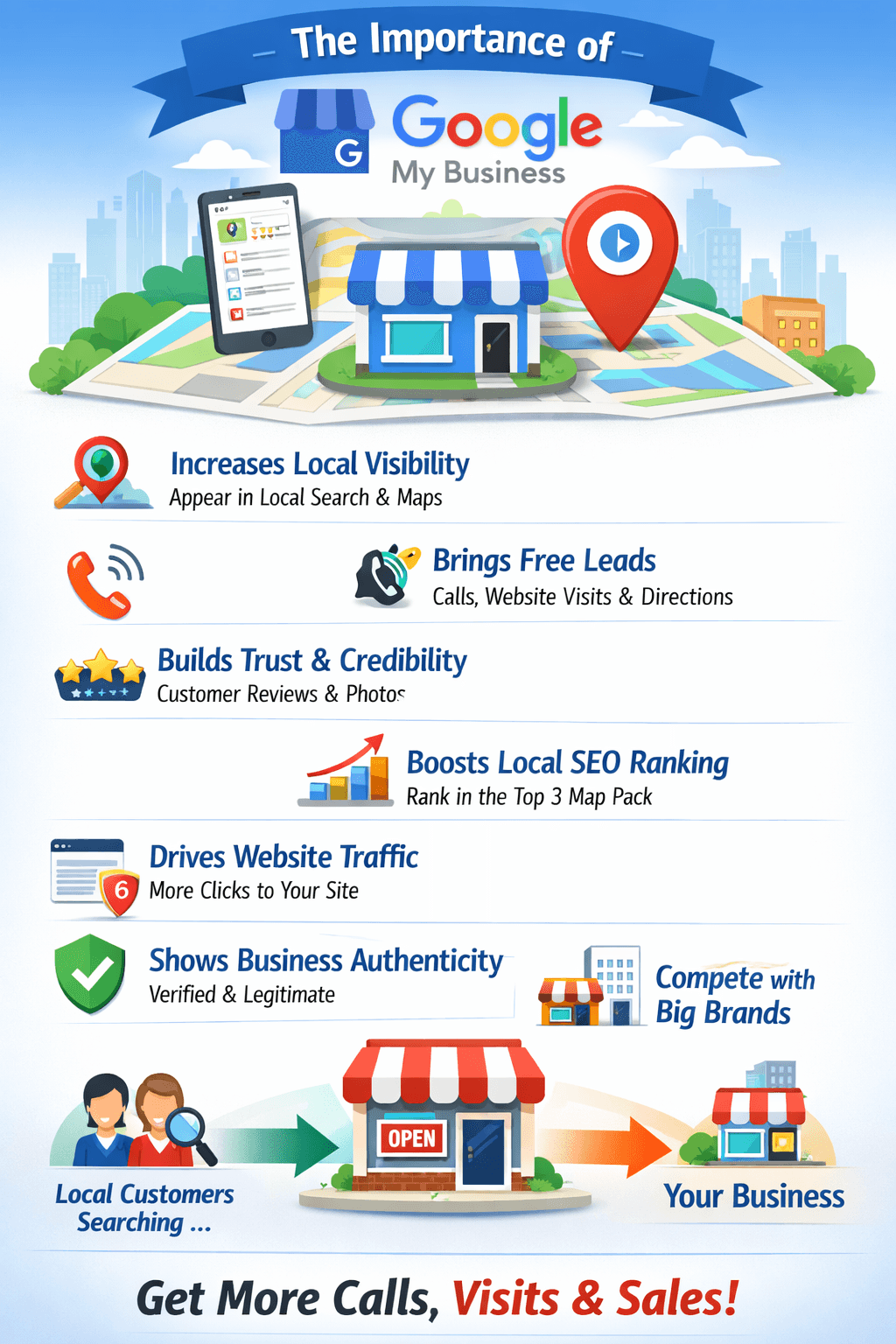
Why Google Business Profile is Important Increases Local Visibility
When people search:
“Digital marketing agency near me”
“Best school in Ranchi”
“Website developer in Jamshedpur”
Google shows local business profiles first before normal websites.
If you don’t have an optimized profile, you miss ready-to-buy customers.
Builds Trust & Credibility
Customers check:
• ⭐ Reviews
• 📸 Photos
• 📍 Location
• 📞 Contact details
A strong profile with reviews builds instant trust.
Brings Free Leads
Customers can:
• Call directly
• Get directions
• Visit your website
• Send messages
All this without spending on ads.
Improves Local SEO Ranking
Google ranks businesses based on:
• Relevance
• Distance
• Prominence
A well-optimized profile helps you rank in the Top 3 Map Results, which gets the maximum clicks.
Increases Website Traffic
Your website link appears directly on your profile.
Many customers visit your site after:
• Checking reviews
• Seeing photos
• Comparing competitors
Boosts Brand Awareness
Even if customers don’t contact immediately, they:
• See your name
• See your photos
• Read reviews
Repeated exposure increases brand recall.
Shows Business Authenticity
Verified badge increases confidence.
It proves:
• You are real
• Your address exists
• Your business is active
Helps You Compete with Bigger Brands
Even small local businesses can outrank big companies in local search with a strong profile.
Google Business Profile is really a great innovation by Google. At first, Google Business Profile seems to be simple. Anybody can simply create a Google Business Profile and add their business name, address, and phone number (NAP) to be listed on Google Search and Google Maps.
For a normal human being, it really is simple.
But if we look Deep, you can conclude that it requires skill and understanding at each and every level.
Now, let’s see how it requires skill and understanding at each and every level.
- Profile Optimization Is Not Just Filling Information
Selection of the Right categories, subcategories, services, and every word plays a vital role in optimizing the business profile. Even a single incorrect selection could Place your Business Wrong, For an Example – If you are in Website development Service and you also do other ancillary service apart from this, you must select one on which google should know you Like, Software Company or Website development any of your choice that define your business best You can Not be best in all so, that one will make a difference
- Keyword Strategy in Business Description In my words it’s how your business in searched by your customer and we call it keyword
Writing a business description is simple. But writing a business description that could improve the business search without violating Google’s guidelines is not simple. Its Like writing about your business that can be understood on shot that these are the product and services you deal with what you will deliver and how you will deliver and this not easy to draft, its should have all that ingredient that customer is in search then only it is important other wise these are just words about your business
- Review Management Review is Trust and more the customer share there experience more is the Trust and this is not that easy even every customer with a 5 Star rating is problem and a smaller number of reviews is also a Problem
Getting more and more reviews is simple. But getting consistent and genuine high-quality reviews and managing them in a strategic manner to improve business ranking is not simple. It works on mantra that every customer and their generic feedback is important and fabrication will not work in long run.
- Photo & Media Optimization
Uploading photos will not work, it will only work like a sign board of your organisation and if you want that the image gets you customer it requires lot of skills
Uploading geo-optimized, high-quality images that boost engagement and conversions is a professional job. Important point is when you are uploading any image make sure that whether that is image your customer want to see and why and accordingly you have to plan the same For an example, if I am grocery shop that is have to showcase my front appearance of my store which give the range of product I am having and stock my store carries so that when customer come to google, they can see that, yes this is the place where I will get all the product of my daily use so accordingly you have to plan the same
- Local SEO & Ranking Factors
It’s like a same product is search in different locality on a different way
Example – A wine shop is search in searched as Theka in Delhi and same is searched as Daru Dukan in Bihar or Jharkhand so you have to work accordingly
Three factors determine the ranking PROXIMITY
Q) What Is Proximity?
Ans-The proximity is the distance from the searcher’s location to your business location.
Example: If someone searches “dentist near me,” Google will show the results that are closest to the searcher’s physical location, even if another dentist has better reviews but is farther away from their location.
Q) How Proximity Works
Ans- If someone searches without a location (e.g., “restaurant”), Google
uses
The following to show results near their location:
• GPS location (mobile) • IP address (desktop)
If someone searches with a location (e.g., “restaurant in Mumbai”), Google shows results near that location.
Important Truth About Proximity
You cannot control proximity.
You cannot "optimize" proximity.
But you can improve how you compete in your area.
How to Compete Despite Proximity Limits
- Maximize Relevance
• Select the appropriate primary category.
• Add detailed services and products.
• Utilize local keywords.
- Increase Prominence
• Achieve 5-star reviews.
• Build local citations.
• Optimize website for local SEO. Like adding words which are generally used in that location
• Acquire local backlinks.
- Expand Service Areas (If Eligible)
• If you're a service area business:
• Set proper service areas on your profile.
• Develop location-based service pages on your website. Like saloon in dader, Saloon in Bandra Kurla and so and so
Real-World Example
Two beauty salons in the same city:
Salon A: 4.9 rating, 200 reviews, 5 km away
Salon B: 4.3 rating, 50 reviews, 1 km away
If the user is closer to Salon B, Google Favors Salon B over Salon A due to the proximity advantage.
Professional Insight
Common thoughts from business owners:
“Why is my competitor ranked higher than me?”
The answer is simple: Your competitor is closer to the user.
Relevance
Relevance means how well your business matches what someone is searching for., What Is Relevance?
Your relevance is Google’s way of judging whether they think your business is the best fit for a particular search term.
Example: If someone searches “emergency dentist open now”, Google will rank businesses that:
Are categorized as “Dentist”
Contain the word “emergency” in their description
Are currently open
Contain relevant keywords in their descriptions
What Affects Relevance?
- Primary Category (Most Important)
Your primary category has the largest effect on your relevance.
Example:
“Digital Marketing Agency” vs “Marketing Consultant” Broad Keywords will give you better result but again it should be on your deliverables
“Pizza Restaurant” vs “Italian Restaurant”
Getting the primary category wrong can greatly decrease your chances of visibility.
- Secondary Categories
Secondary categories give Google an idea of the other services you offer apart from your core Service
- Services & Products Section
Adding extra information in the “services and products” section can greatly enhance keyword relevance.
Example: Instead of listing “Plumbing” as a service, list:
“Leak Repair”
“Bathroom Installation”
“Pipe Replacement”
- Business Description
This helps, but it carries less ranking strength than categories. Make sure it’s clear, natural, and not keyword rapped.
- Reviews
If customers write about your keywords in the review section, for example, “best bridal makeup artist,” this increases your topical relevance. Google Consider that you are offering a service and experience of the customer is good after experience of the service so google push your business on top.
- Website Content
Google makes a direct correlation between your website SEO and your profile. Location pages and service pages improve your relevance.
Simple Example
If your query is: “Best Wedding Photographer in Delhi”
Google checks:
• Are you categorized under a Photographer? • Are you talking about Wedding Photography? • Are your customers talking about Wedding Photography? • Is your website optimized for Wedding Photography? • If yes, then High Relevance.
Professional Insight
You can’t rank for everything.
If you try to rank for:
• SEO • Web design • App development • Digital marketing • Social media marketing
GOOGLE MIGHT GET CONFUSED ABOUT YOUR MAIN FOCUS. High Relevance = High Specialization.
PROMINENCE.
Prominence for Google My Business (Google Business Profile) is one of the 3 main local ranking factors Google uses to determine the ranking of local search engine result pages and Google maps for a business.
Google Local Ranking Factors: Relevance – How well your business fits the search query.
Distance – How far your business is from the searcher.
Prominence – How well-known and trusted your business is online and offline.
What does Prominence mean?
Prominence means the popularity, authority, and reputation of your business according to Google.
The more credible and well-known your business is online, the higher the chances of ranking your business in the Local Pack – Top 3 Map Results.
Example: A business that has a high number of reviews, good SEO, website mentions, and backlinks will have a higher ranking than a new business that has little online presence. Understanding the impact of citations, backlinks, website SEO, and user engagement on the profile requires technical know-how. Factors That Affect Prominence
Google Reviews (Most Important)
• No. of Google Reviews
• Quality of Google Reviews
• Keywords in Google Reviews
• Frequency of Google Reviews
• Owner Response to Google Review
Tips:
• Ask each customer for Google Review
• Respond to each Google Review
• Use keywords in response to Google Review
Website SEO Strength
• Google checks your website strength.
• Important aspects:
• Local SEO optimization
• Fast website
• Responsive website design
• Use of location-based keywords in website (e.g., "Website Development in Ranchi")
Backlinks (Online Authority)
Having other sites link to your site increases trust.
Examples:
• Local directory sites
• News sites
• Business listing sites
• Guest blogging sites
Business Citations (NAP Consistency)
Your business information should match across the web:
• Name
• Address
• Phone Number
• Platforms:
• Justdial
• IndiaMART
• Sulekha
• Yelp
Online Mentions & Brand Presence
Google tracks the number of times your business is talked about online.
Includes:
• Social media presence
• Mentions on blogs
• Mentions in local media
• Presence on platforms
Profile Completeness
A well-optimized Google Business Profile can greatly enhance your business’s prominence.
Must include:
• Categories
• Services
• Products
• Photos
• Posts
• FAQs
Business description
User Engagement Signals
Google tracks:
• Calls from profile
• Direction clicks
• Visits to website
• Photo views
MORE = MORE PROMINENCE.
How to Increase Prominence (Step-by-Step) Step 1 — Get Reviews Weekly
Aim for 5-10 reviews every month
Step 2 — Post on GMB Weekly
• Offers
• Updates
• Work photos
• Client results
Step 3 — Add Real Photos Regularly
• Office
• Team
• Work process
• Before/After
Step 4 — Build Local Backlinks
• Local blogs
• Chamber of commerce
• School/business partnerships
Step 5 — Optimize Website for Local Keywords
Example:
• “Digital Marketing Agency in Jamshedpur”
• “Website Development Company Ranchi”
Simple Formula
PROMINENCE = REVIEWS + SEO + BACKLINKS + MENTIONS + ENGAGEMENT
- Suspension & Policy Compliance
Suspension & Policy Compliance in Google Business Profile If your Google Business Profile has been suspended, this means that Google has removed your business listing from Google Search & Maps due to policy violations.
It is important to grasp the reasons for suspension and how to remain compliant.
Types of Suspension • Your business listing is visible on Google • You lose management privileges • You can’t edit anything, nor can you reply to any reviews
Caused by issues related to verification and ownership.
Hard Suspension Your business listing has been removed from Google Search & Maps Customers can’t find you Your reviews are removed, at least for a short while • Caused by policy violations. • Common Reasons for Suspension • Keyword Stuffing in Business Name
“ABC Digital Marketing – Best SEO Company in Jamshedpur”
Google accepts only real registered business names.
Fake Address/Virtual Office
• Using a Coworking Office Without Signage
• Using a Residential Address as a Storefront
• P.O. Box/Virtual Office
• Google accepts real physical locations for storefront businesses.
Multiple Listings for Same Business
• Creating Duplicate Profiles for:
• Same Address
• Same Service
• Same Phone Number
Service Area Violations
• If you are a service business:
• You must hide your business address
• You should not mark service areas you do not operate in
Fake Reviews or Review Gating
• Purchasing Reviews
• Posting Your Own Reviews
• Asking Only Happy Customers for Reviews
Frequent Edits/Suspicious Changes
• Changing Your Address Repeatedly
• Changing Your Category Often
• Editing Your Name Repeatedly
Restricted Business Categories
• Certain types of businesses face more scrutiny:
• Locksmith Businesses
• SEO/Marketing Agencies
• Real Estate Businesses
• Financial Businesses
• Adult Businesses
Important Policies You Must Follow
Follow the official policies of Google:
Business Name
Exact legal name only.
Address
Must be:
• Real
• Verifiable
• With a sign
With staff available during business hours
Categories
Primary category only.
Website
• Match the business name and address
• Not redirect to other unrelated pages
• Not be under construction
How to Recover Suspended Profile
Step 1: Identify the Violation
• Audit:
• Business name
• Address
• Categories
• Photos
• Website
Step 2: Correct All Issues
Make sure you correct all the issues.
Step 3: Submit the Reinstatement Form.
Submit the appeal through Google Business Profile Support.
You may need:
• GST certificate
• Business registration
• Utility bill
• Shop license
• Office photos (inside and outside with a sign)
Step 4: Wait 3-14 Days
Do not change the profile while under review.
Prevention Checklist ✔ Use a real business name ✔ Use NAP consistency ✔ Do not create duplicate profiles ✔ Do not write fake reviews ✔ Ensure address accuracy ✔ Ensure website accuracy ✔ Do not change the profile frequently
Pro Tip for Agencies (Like Digital Marketing Businesses)
Since SEO & Digital Marketing profiles get suspended frequently:
• Do not add keywords to the name
• Show real office photos
• Add team photos
• Post frequently